March 1st, 2026
This month’s updates focused on plans, teams, and a major overhaul to single sign-on.
Plus Plan is now live
The Plus Plan is now available for new signups and upgrades. It’s our highest-tier plan and includes unlimited racks and rooms, more slot types and team members, and advanced features like API access, webhooks, SSO, custom domains, and inventory management.
We also updated the Basic Plan, which now includes 3 team members. The Plus Plan includes 20 team members.
Teams are out of beta
Teams are now officially out of beta, along with a number of improvements across the experience.
This month we shipped:
Multiple team support, so users can now join more than one team
A new Teams API endpoint at
/v1/user/teamsTeam names, making teams easier to identify in the switcher
A new sidebar team switcher, with support for switching via
CMD/Ctrl + KA much faster Team Members table
New team usage visibility in Team Settings
Self-service team transfer, so ownership can now be transferred to another existing team member
When transferring a team, the new owner must not already own another team. If they do not have a valid subscription, the team will move into read-only mode until one is added. After transfer, the previous owner becomes an admin.
SSO has been redesigned
We also rolled out a major SSO refresh focused on making setup and access more secure and easier to manage.
New improvements include:
SSO support directly on rackmanage.io
JIT provisioning with configurable default roles
The ability to require SSO for team members
Optional exceptions for specific users when SSO enforcement is enabled
Built-in setup guides for providers like Azure, Okta, and Auth0 with support for any provider using generic SAML or OIDC configurations.
A shareable setup link so external IT admins can configure SSO without joining the team
UI improvements
We gave both the Settings page and Login page a light refresh. The login page also now shows your last login method, making it easier to jump back in with the right provider.
Plus a few fixes
As always, this release also includes general bug fixes and minor styling improvements across the app.
January 31st, 2026
Autosave
Avoid losing your changes and the need to manually press save by turning on the new autosave feature in your account preferences.
With autosave enabled, your racks and rooms will save automatically when changes are detected. Autosave is enabled for new accounts created after January 10th, existing users can enable autosave from the settings page: https://rackmanage.io/app/settings
API Updates
This release includes major upgrades the the Rack Manage API including:
Improved documentation
Support for teams
New endpoints for team management
New endpoints for slot type management
Ability to create and update racks
Ability to update slots within racks
Ability to create and update rooms
To interact with the Rack Manage API on behalf of a team you are a member of, simply pass your team ID in the X-Team-ID header of your API request.
You can obtain your team ID by visiting https://rackmanage.io/app/settings?tab=4
Your team members’ assigned permissions will apply when interacting with the API, allowing you to restrict who can perform read/write/admin operations in your team.
Team Updates
Team members can now leave a team on their own by visiting the team settings page https://rackmanage.io/app/settings?tab=4
Bug & Styling Fixes
We’re constantly working on improving the platform and fixing bugs. This release includes various bug fixes and improvements, including fixes for:
SSO configuration failing to launch
Users unable to sign-in while accepting team invitation
Users unable to accept team invitation while already signed in
Sidebar navigation links not opening in new tab
Team Viewer/Editor restrictions applied inconsistently
Users not switched automatically to team mode after accepting invitation
Improved webhook processing
Improved search indexing
November 26th, 2025
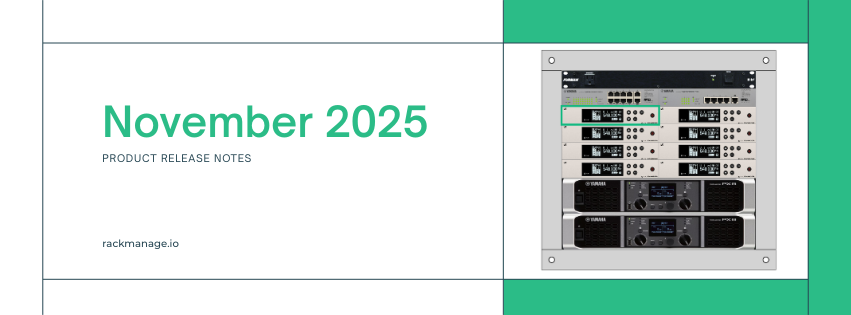
This release includes several major updates to Rack Manage, including new features and extensive improvements to the rack editor engine in preparation for the upcoming Inventory Management feature.
Across the platform, we’ve focused on speed, reliability, and overall usability.
New Features
Half-Width Slots

One of our most requested features has arrived!
You can now add half-width slots to your racks for smaller rack-mounted equipment.
Half-width slots resize to 9.5” when enabled
Drag and drop them between the left and right side of a slot
Store all the same data as full-width slots
Reorder using the same drag-and-drop interactions you’re used to
Half-width support brings new flexibility and more accurate rack layouts.
Redesigned Details Panels and Forms for Racks and Rooms
The editor and viewer side panels for racks and rooms have been fully redesigned to improve readability, organization, and workflow efficiency.
Across all detail views, information is now grouped into clear, modern cards with improved typography and iconography, making it much easier to scan important details at a glance.


Slot Filtering

Finding the right slot type is now easier than ever.
In the slot type menu, click Filter to narrow your search by:
Category
Manufacturer
Size
Width
Slot Text Style

Make your rack labels clearer and more organized with customizable text styling.
When slot names are enabled, right-click a slot to adjust:
Font size
Font weight
Text color (choose from preset colors or a custom color picker)
Selecting the color wheel/gradient button opens a full color picker, where you can choose from a color spectrum or type a HEX code for precise color selection.

Using Copy Style and Paste Style, you can quickly apply your preferred text styling across multiple slots.
Keyboard Shortcuts
Navigate Rack Manage faster with new global and editor-specific shortcuts.
Global
Ctrl + K/⌘ + K: Open Quick Search from anywhere
While in a rack or room
E/V: Switch between Editor and Viewer modes1-5: Switch between tabsArrow keys: Move selection between slots
Escape: Deselect the current object
Inside the rack and room editors
Ctrl + C/⌘ + C: Copy a slot or objectCtrl + V/⌘ + V: Paste a slot or objectBackspace: Delete the selected slot or object
Keyboard navigation makes working inside complex racks and rooms significantly smoother.
Quick Search

Quickly find anything, including racks, rooms, pages, and actions, from any page.
Press Ctrl + K / ⌘ + K to:
Search and navigate to racks or rooms
Jump to dashboard, settings, and more
Trigger instant actions (toggle dark mode, switch mode, etc.)
Use your arrow keys, escape, and enter to quickly navigate and select search results.
Quick Search is built to reduce friction and help you move around Rack Manage without breaking focus.
Duplicate Racks & Rooms
Quickly create a copy of any rack or room.
From the dashboard, click the ellipses menu next to an item to duplicate it.
Duplicating a rack copies all slots, rack data, and ordering.
Duplicating a room copies all racks and objects inside the room.
This makes it easy to create templates, experiment with new configurations, or quickly spin up similar environments.
Improvements
Last Updated Timestamp
The rack and room viewers now display the last updated date and time at the bottom of the details panel.
Updated Verification Emails
Verification emails now include a plain-text URL in addition to the action button. This ensures reliable account verification even in strict email clients.
Page Titles
Your browser tab now displays the name of the page, rack, or room you're viewing. This makes multitasking with multiple tabs far easier.
Improved Image Loading
Slot Types now use an updated caching solution to reduce load times, especially for racks containing multiple instances of the same slot type.
Infrastructure Upgrades
All core services powering Rack Manage are now running in multiple regions to improve the reliability and performance of the application.
Bug & Styling Fixes
We’re constantly working on improving the platform and fixing bugs. This release includes various bug fixes and improvements, including fixes for:
Settings page failing to load when Inventory Management is enabled
Sidebar menu displaying an extra border
Syntax highlighting not displaying correctly on the Webhook Settings page
In-product help links pointing to outdated knowledge base articles
DNS records page displaying SSL records incorrectly
Webhooks failing to send in Team Mode
Memory leaks in the rack editor
August 23rd, 2025
Billing Updates
New subscriptions purchased on or after August 23, 2025 will be managed by Link.com.
You may notice a change in your invoices, receipts, and statement descriptors. Rather than being billed directly from Rack Manage, your receipts and invoices will now be issued by our partners at LemonSqueezy LLC, and statement descriptors will now display LINK.COM* RACK MANAGE rather than RACK MANAGE*.
With this change you can now subscribe to Rack Manage using a Link.com account and can continue to manage your subscription from rackmanage.io, or at Link.com.
There are no changes in pricing or impact to users with subscriptions created before August 23, 2025.
Please visit Link.com support for more information or for support with payment methods or refunds.
April 10th, 2025
Inventory Management (Beta)
Inventory Management is now in open beta for users on paid plans.
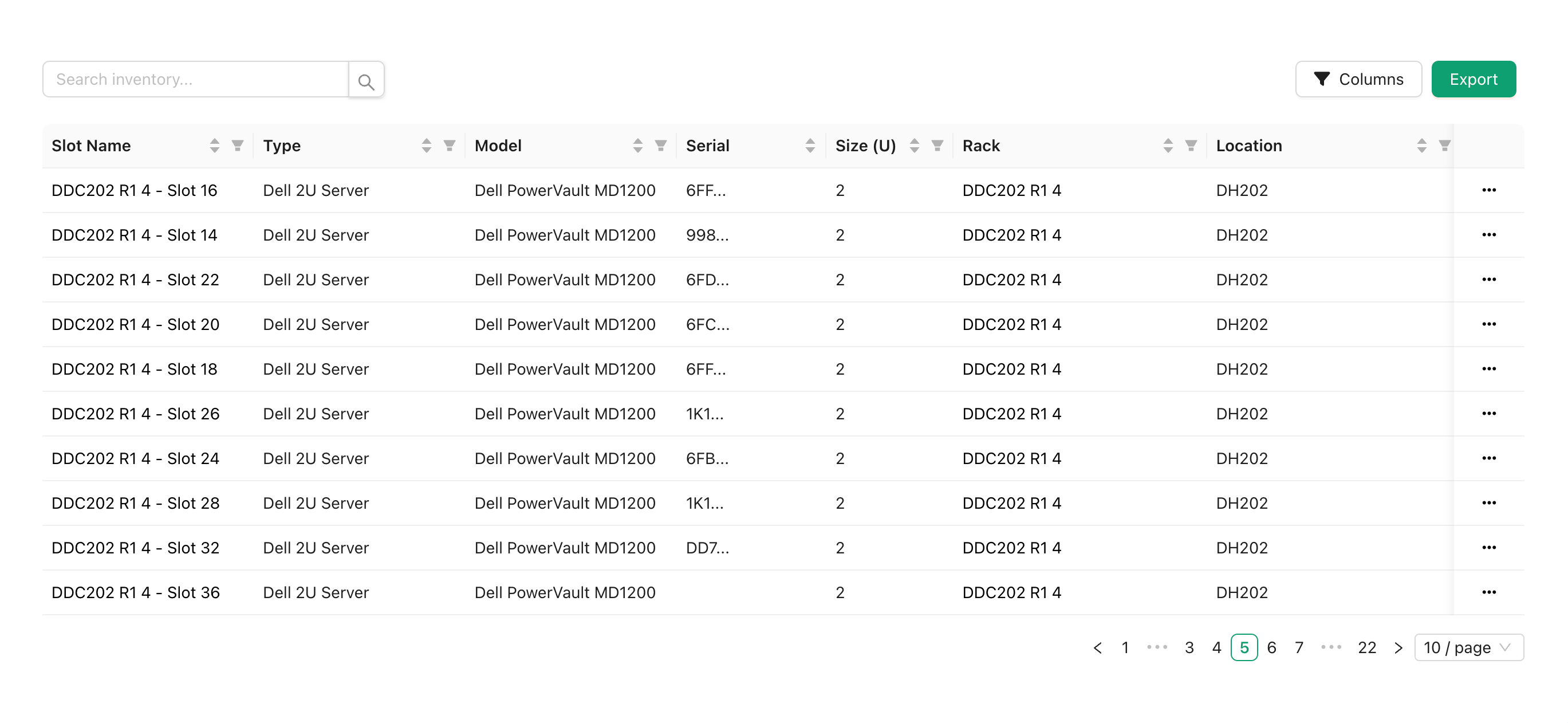
With Inventory Management you can view all slots from all of your racks in one place, search and filter slots, export your entire inventory to JSON or CSV, and open a rack viewer or editor automatically selecting your slot.
In future versions of Inventory Management, you will be able to add additional details to inventory objects and sync the details across all racks with the same object, add existing inventory objects to racks, and create inventory objects without being assigned to a rack.
To enable Inventory Management, head to your account settings and turn on “Inventory Management” under “Early Access Features”, then refresh the page for the changes to apply.

If you are unable to see the “Early Access Features” section, ensure that you are on a paid plan and have all cookies enabled.
Bug & Styling Fixes
We’re constantly working on improving the platform and fixing bugs. This release includes various bug fixes and improvements, including fixes for:
Rack slots displaying with inconsistent sizing
Custom slots causing the racks to fail to load
Custom slot type cropping tool failing to load
Slot types showing up in the wrong category in the editor
Sidebar menu links failing to open in new tab, or opening page in both the current tab and new tab when attempting to open in new tab
Unsaved changes confirmation prompt display twice when leaving a rack or room
March 31st, 2025
Internal Updates
Rack Manage has been internally rewritten in TypeScript, using a new design system and database for improved stability.
Room Editor Rotation
Objects in the room editor will now snap to every 45 degrees of rotation, allowing you to easily set the rotation on objects to the same value.
Bug & Styling Fixes
We’re constantly working on improving the platform and fixing bugs. This release includes various bug fixes and improvements.
November 30th, 2024
Custom Slot Types
You can now create your own slot types! When choosing a slot type from the rack editor, or from the new “Slot Types” page, upload your own photo and add your custom slot to your racks. Users on all plans can upload unlimited public slot types, while users on paid plans can also upload private slot types, visible only to their account or team.
Bug & Styling Fixes
We’re constantly working on improving the platform and fixing bugs. This release includes various bug fixes and improvements.
July 1st, 2024
Added Slot Name Overlay
You can now choose to display your slot name directly on the rack viewer to quickly see your labels. From your account preferences, choose whether slot names should be shown always, never, or on hover.
Added Rack Numbering
You can now display rack numbers along the side rails of your racks, visible in the rack editor. From your account preferences, choose whether to enable or disable rack numbering, and choose descending or ascending numbering.
Bug & Styling Fixes
We’re constantly working on improving the platform and fixing bugs. This release includes various bug fixes and improvements.
June 1st, 2024
Added Slot, Rack, and Room Notes
You can now add custom notes to your slots, racks and rooms, allowing you to save information that doesn’t fit into one of the predefined options.
Improved Table Sorting
Rack and Room tables can now be sorted by name, size, location, number of racks, and percent full, allowing you to find your data easier.
Added Clear Form button
The rack editor now has a “Clear Form” button allowing you to quickly erase the values in the name / serial / model / notes fields.
Improved Search
Search now shows details of matching slots, types, and notes. Search within dropdown fields such as when choosing a slot type or adding a rack to a room has also been improved for more accurate results.
Added SSO Auto Registration
When using a Single Sign-On provider, you can now choose whether users must register via an invitation email, or allow all users from your identity provider to automatically join your team upon their first login.
Added Leave Team Button
Team members can now leave their team without the need to be removed by an admin from the account settings page.
Bug & Styling Fixes
We’re constantly working on improving the platform and fixing bugs. This release includes fixes for the authentication system, account linking, account deletion, SSO accounts, and various styling improvements.
April 1st, 2024
API Updates
The Rack Manage API (https://api.rackmanage.io/v1) has been rewritten from the ground up, significantly increasing performance.
While the API has changed on the backend, this change should be invisible to users and follows the same OpenAPI spec as before https://api.rackmanage.io/v1/spec. The new API also has an interactive interface available at https://api.rackmanage.io/v1/ui. The previous SwaggerHub interface will be retired and users are encouraged to use the the new UI interface instead.